> ## Documentation Index
> Fetch the complete documentation index at: https://cometchat-22654f5b-docs-rn-push-notifications-unified.mintlify.site/llms.txt
> Use this file to discover all available pages before exploring further.
# React Native Push Notifications (Android)
> CometChat push notifications and VoIP calls in React Native apps on Android using Firebase Cloud Messaging (FCM) and the @cometchat/push-notifications-react-native package.
| Field | Value |
| ------------- | ---------------------------------------------------------------------------------------------------------------------------------------------------------------------------------------------------- |
| Platform | Android (FCM) |
| Package | `@cometchat/push-notifications-react-native` |
| Key APIs | `CometChatPushNotifications.init()`, `onNotificationTap()`, `onCallAccepted()`, `onCallEnded()`, `unregister()`, `registerBackgroundCallTask()`, `CometChatPNHelper.requestNotificationPermission()` |
| Push Platform | `FCM_REACT_NATIVE_ANDROID`, registered by `init()` with `fcmProviderId` |
| Native setup | `google-services.json` + Google Services plugin, `minSdkVersion 24`, an `ic_notification` drawable. No manifest or Kotlin changes |
| Prerequisites | CometChat initialized and the user logged in before `init()`, an FCM provider ID, a physical device for call tests |
Reference implementation of React Native UI Kit, FCM and Push Notification Setup.
## What this guide covers
* CometChat dashboard setup (enable push, add FCM provider) with screenshots.
* Firebase + React Native wiring (credentials, the push package, the Google Services plugin).
* Wiring the package's notification and call handlers into your app.
* Native Android setup (Gradle, notification icon) — no manifest entries or Kotlin code to write.
* Token registration, notification/call handling, navigation, testing, and troubleshooting.
* App icon badge count using `unreadMessageCount` from the CometChat push payload.
## How FCM + CometChat work together
* **FCM's role:** Issues the Android registration token and delivers the push payload to the device.
* **CometChat's role:** The FCM provider you add in the CometChat dashboard stores your Firebase service account. When `CometChatPushNotifications.init()` runs after login, the package registers the token for the logged-in user, and CometChat sends pushes to FCM on your behalf.
* **The package's role:** Its own `FirebaseMessagingService` receives each push and shows the chat notification or the full-screen incoming call. Every CometChat action — registering the token, accepting or rejecting a call — runs in JavaScript through the Chat SDK your app already uses.
* **Flow:** Permission (Android 13+ `POST_NOTIFICATIONS`) → Firebase returns the FCM token → after login, `init()` registers it with `AppCredentials.fcmProviderId` → CometChat sends to FCM → FCM delivers to the device → the package shows the notification or call → your `onNotificationTap`, `onCallAccepted` and `onCallEnded` handlers navigate.
## 1. Enable push and add providers (CometChat Dashboard)
1. Go to **Notifications → Settings** and enable **Push Notifications**.
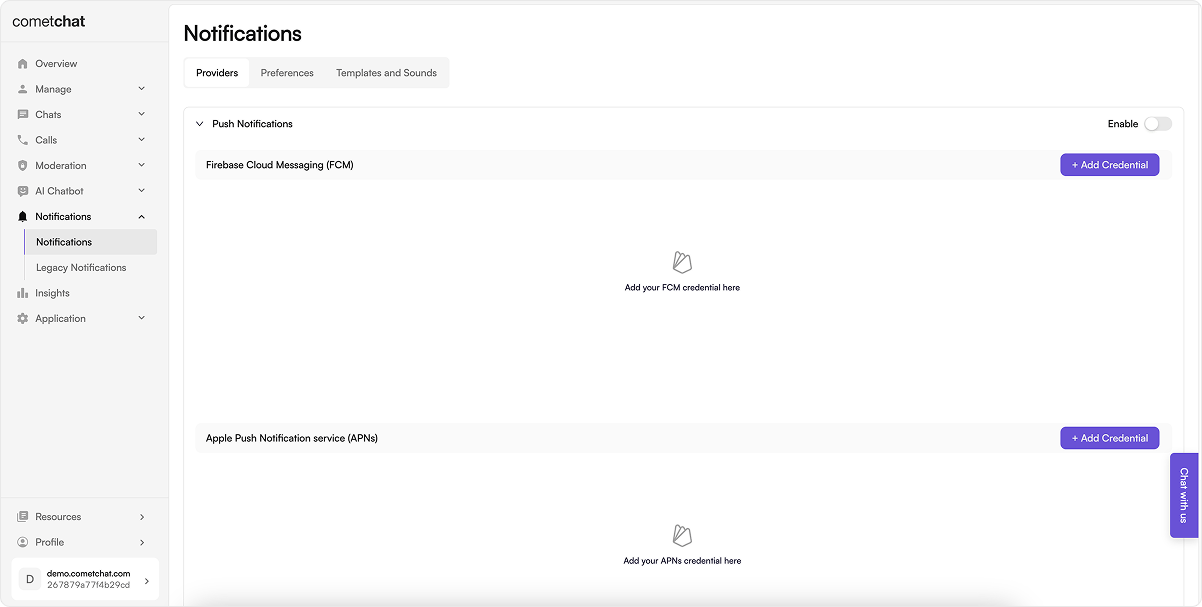 2. Click **Add Credentials**, choose **FCM**, upload the Firebase service account JSON (Firebase → Project settings → Service accounts → Generate new private key), and copy the Provider ID.
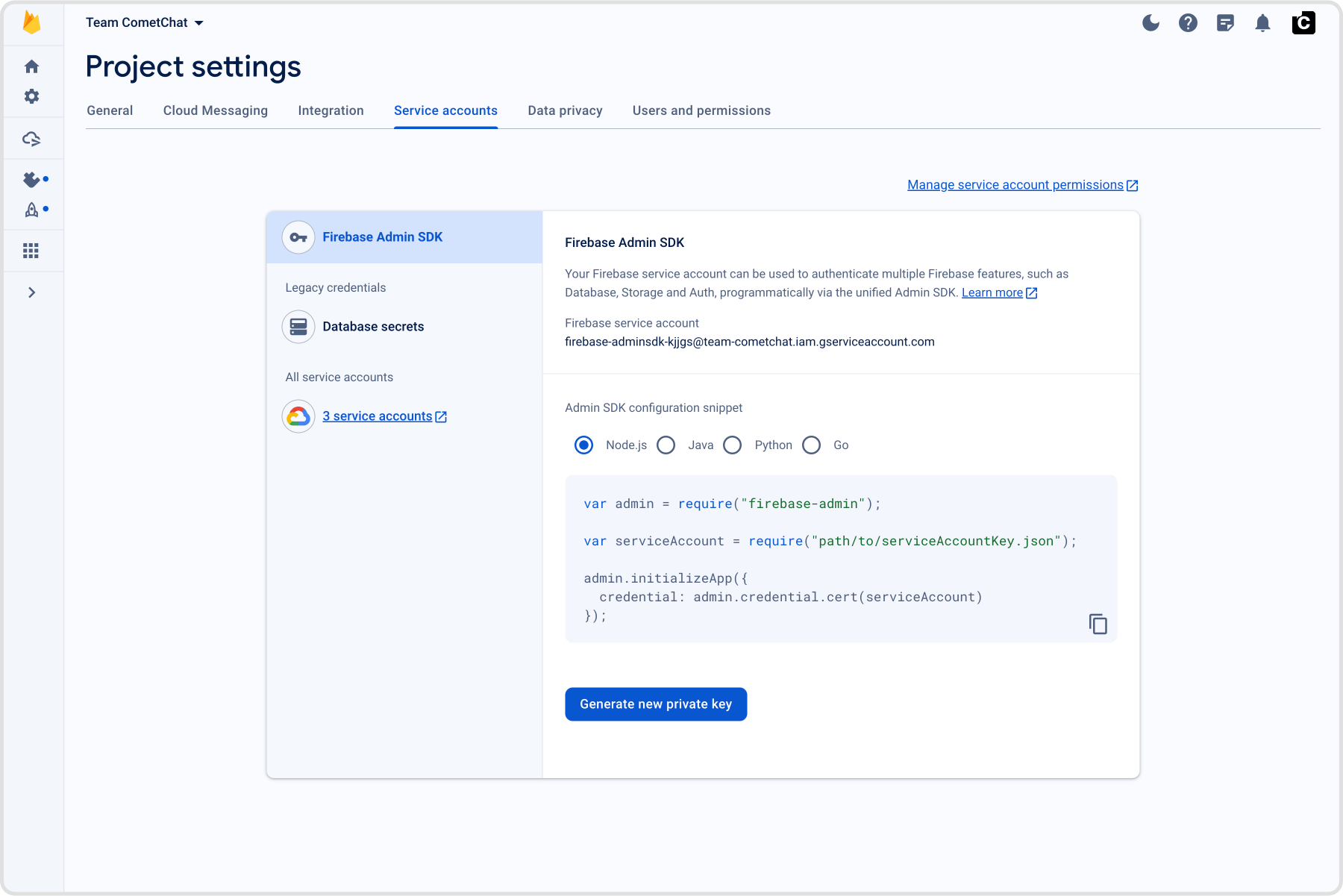 Keep the provider ID—you'll use it in `AppCredentials.fcmProviderId`.
## 2. Prepare Firebase and credentials
### 2.1 Firebase Console
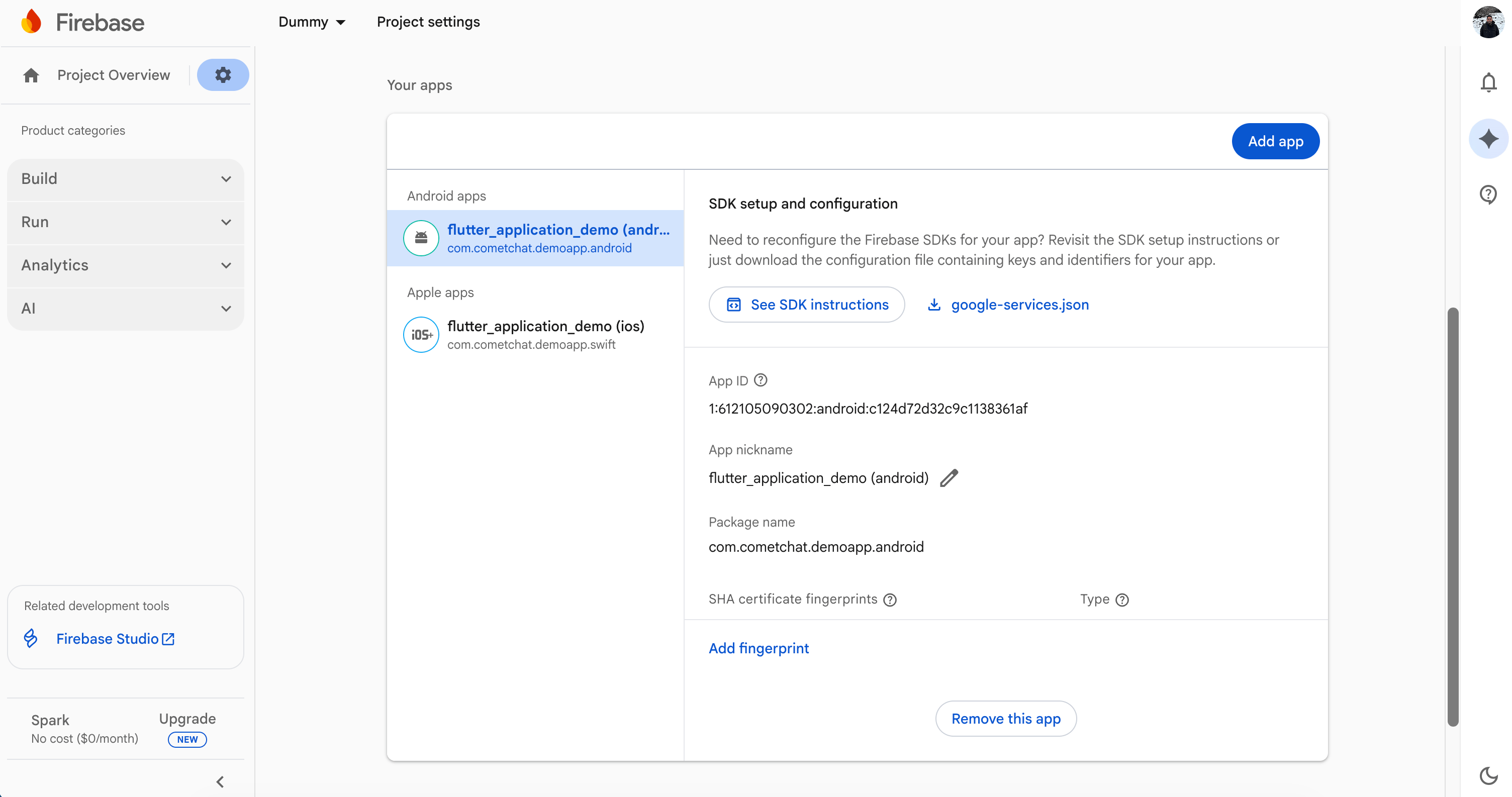
1. Register your Android package name (the same as `applicationId` in `android/app/build.gradle`) and download `google-services.json` into `android/app`.
2. Enable Cloud Messaging.
Keep the provider ID—you'll use it in `AppCredentials.fcmProviderId`.
## 2. Prepare Firebase and credentials
### 2.1 Firebase Console
1. Register your Android package name (the same as `applicationId` in `android/app/build.gradle`) and download `google-services.json` into `android/app`.
2. Enable Cloud Messaging.
 ### 2.2 Local configuration file
Create `src/AppCredentials.ts` with your app credentials and provider IDs. The same file serves the [iOS guide](/notifications/react-native-push-notifications-ios):
```ts src/AppCredentials.ts lines theme={null}
export const AppCredentials = {
appId: 'YOUR_APP_ID',
region: 'YOUR_REGION',
authKey: 'YOUR_AUTH_KEY',
// Android — the FCM provider ID from the CometChat dashboard
fcmProviderId: 'FCM-PROVIDER-ID',
// iOS — one APNs provider covers both the device token and the VoIP token
apnsProviderId: 'APNS-PROVIDER-ID',
};
```
## 3. Bring the push package into React Native
### 3.1 Install the package
```bash theme={null}
npm install @cometchat/push-notifications-react-native
```
**Remove other push and call libraries first** — `@notifee/react-native`, `react-native-callkeep`, `react-native-voip-push-notification` — along with their code and native setup, or every notification or call arrives twice. If you keep `@react-native-firebase/messaging` for other features, follow step 4.5.
### 3.2 Wire the entry points
The JavaScript below is the same for Android and iOS — one set of files serves both guides. Lines for one platform do nothing on the other: `registerBackgroundCallTask()` and `notificationSmallIcon` only apply on Android, and waiting for each permission answer before the next request matters only on Android.
**`index.js`** — register the package's background task at module scope. It lets a **fully killed** app reject a call declined from its notification: the package re-initializes the Chat SDK with the settings `init()` saved, and rejects the call.
```js index.js lines theme={null}
import { AppRegistry } from 'react-native';
import { registerBackgroundCallTask } from '@cometchat/push-notifications-react-native';
import App from './App';
import { name as appName } from './app.json';
// Android: lets a FULLY KILLED app reject a call declined from its notification. The package
// does the work — this only registers its background task. (No-op on iOS.)
registerBackgroundCallTask();
AppRegistry.registerComponent(appName, () => App);
```
To add your own logic, pass a handler — it runs **after** the package has rejected the call:
```js lines theme={null}
registerBackgroundCallTask(async (action, info) => {
// Your logic, e.g. record the declined call. The Chat SDK is initialized and logged in here.
console.log('Declined call from', info.callerUid);
});
// Or reject it yourself instead:
// registerBackgroundCallTask(myHandler, { rejectDeclinedCalls: false });
```
**`src/navigation/navigationRef.ts`** — a notification tap or answered call that **launched** the app arrives before your navigator exists, so every navigation waits for it:
```ts src/navigation/navigationRef.ts lines theme={null}
import { createNavigationContainerRef } from '@react-navigation/native';
/** Pass this to your . */
export const navigationRef = createNavigationContainerRef();
/**
* Resolves once the NavigationContainer is mounted. A notification tap or answered call
* that LAUNCHED the app arrives before the navigator exists, and navigating then is
* silently dropped. The ref queues listeners added before it mounts.
*/
export function whenNavigationReady(): Promise {
if (navigationRef.isReady()) return Promise.resolve();
return new Promise(resolve => {
const unsubscribe = navigationRef.addListener('ready', () => {
unsubscribe();
resolve();
});
});
}
/** Navigate by route name once the navigator is ready. */
export async function navigate(name: string, params?: object): Promise {
await whenNavigationReady();
(navigationRef.navigate as (name: string, params?: object) => void)(name, params);
}
```
**`src/push/pushNotifications.ts`** — everything push does for the logged-in user: the tap, call-accepted and call-ended handlers, the permission requests, and `init()`:
```ts src/push/pushNotifications.ts lines theme={null}
import { useEffect, useState } from 'react';
import { CometChat } from '@cometchat/chat-sdk-react-native';
import { CometChatCalls } from '@cometchat/calls-sdk-react-native';
import { CometChatUIEventHandler, MessageEvents } from '@cometchat/chat-uikit-react-native';
import {
CometChatPNHelper,
CometChatPushNotifications,
type PNCallEndEvent,
type PNCallInfo,
type PNNotificationTapInfo,
} from '@cometchat/push-notifications-react-native';
import { AppCredentials } from '../AppCredentials';
import { navigate, navigationRef } from '../navigation/navigationRef';
/** Your navigator's route names — these are the CometChat UI Kit sample app's. */
const SCREENS = {
messages: 'Messages',
thread: 'ThreadView',
ongoingCall: 'OngoingCallScreen',
home: 'BottomTabNavigator',
} as const;
const LOGIN_LISTENER_ID = 'push-notifications-login';
/**
* Starts push for the logged-in user. Call it from React with `usePushOnLogin()` (below)
* rather than directly: it returns a cleanup that must run on logout, or every handler
* fires twice after the next login.
*/
export function setupPushOnLogin(): () => void {
// Subscribe BEFORE init(): the tap or answered call that LAUNCHED the app is delivered
// as soon as init() runs.
const unsubscribes = [
CometChatPushNotifications.onNotificationTap(openFromNotification),
CometChatPushNotifications.onCallAccepted(openCallScreen),
CometChatPushNotifications.onCallEnded(endCall),
];
const start = async () => {
// Await each permission request before the next — Android allows only one pending
// request per activity. A rejection means the OS could not be asked (not that the user
// declined), and must not stop init(): the push token still has to register.
await CometChatPNHelper.requestNotificationPermission().catch(() => false);
await CometChatPNHelper.requestCallPermissions(); // mic + camera, needed before a call connects
await CometChatPushNotifications.init({
fcmProviderId: AppCredentials.fcmProviderId, // Android
apnsProviderId: AppCredentials.apnsProviderId, // iOS (APNs device + VoIP)
notificationSmallIcon: 'ic_notification', // Android status-bar icon
showInForeground: true, // one notification while the app is open, too
ringInForeground: false, // your app rings while it's open — see src/calls/IncomingCall.tsx
});
};
start().catch(error => console.log('Push setup failed:', error));
return () => unsubscribes.forEach(unsubscribe => unsubscribe());
}
/**
* Runs push while a user is logged in — after a fresh login AND after a session restored
* on launch — and cleans up on logout. Use it once, in a component rendered after
* CometChat has been initialized.
*/
export function usePushOnLogin(): void {
const [loggedIn, setLoggedIn] = useState(false);
useEffect(() => {
// A restored session never fires loginSuccess, so check once on mount.
CometChat.getLoggedinUser()
.then(user => setLoggedIn(!!user))
.catch(() => setLoggedIn(false));
CometChat.addLoginListener(
LOGIN_LISTENER_ID,
new CometChat.LoginListener({
loginSuccess: () => setLoggedIn(true),
logoutSuccess: () => setLoggedIn(false),
}),
);
return () => CometChat.removeLoginListener(LOGIN_LISTENER_ID);
}, []);
useEffect(() => {
if (!loggedIn) return;
return setupPushOnLogin();
}, [loggedIn]);
}
/** Open the thread for a thread reply, otherwise the conversation. */
async function openFromNotification(info: PNNotificationTapInfo): Promise {
const isGroup = info.receiverType === 'group';
try {
const user = !isGroup && info.sender ? await CometChat.getUser(info.sender) : undefined;
const group = isGroup && info.receiver ? await CometChat.getGroup(info.receiver) : undefined;
if (!user && !group) return;
markConversationRead(isGroup ? info.receiver! : info.sender!, isGroup);
if (info.parentMessageId) {
try {
const parent = await CometChat.getMessageDetails(info.parentMessageId);
// The thread screen needs the user or group, not just the parent message.
await navigate(SCREENS.thread, { message: parent, user, group, highlightMessageId: info.messageId });
return;
} catch (error) {
console.log('Could not open the thread, opening the conversation:', error);
}
}
await navigate(SCREENS.messages, { user, group });
} catch (error) {
console.log('Could not open the conversation from a notification:', error);
}
}
/** Mark the conversation read and clear its unread badge in the UI Kit's conversation list. */
function markConversationRead(conversationWith: string, isGroup: boolean): void {
const type = isGroup ? CometChat.RECEIVER_TYPE.GROUP : CometChat.RECEIVER_TYPE.USER;
CometChat.markConversationAsRead(conversationWith, type)
.then(() => CometChat.getConversation(conversationWith, type))
.then(conversation => {
const lastMessage = conversation.getLastMessage();
if (lastMessage) {
CometChatUIEventHandler.emitMessageEvent(MessageEvents.ccMessageRead, { message: lastMessage });
}
})
.catch(error => console.log('Could not mark the conversation read:', error));
}
/** The package has already accepted the call — just show the call screen. */
function openCallScreen(info: PNCallInfo): void {
navigate(SCREENS.ongoingCall, { sessionId: info.sessionId, callType: info.callType });
}
/**
* A ringing call was cancelled or declined, or the user ended the call from the iOS call
* screen — which the Calls SDK does not see, so tear the call down here.
*/
function endCall(info: PNCallEndEvent): void {
if (info.sessionId) CometChat.endCall(info.sessionId).catch(() => {});
try {
CometChatCalls.endSession();
} catch {}
try {
CometChat.clearActiveCall();
} catch {}
if (navigationRef.isReady() && navigationRef.getCurrentRoute()?.name === SCREENS.ongoingCall) {
navigate(SCREENS.home);
}
}
```
**`src/calls/IncomingCall.tsx`** — `init()` above sets `ringInForeground: false`, so **while the app is open the package doesn't ring: your app must show its own incoming-call screen**, or calls won't ring at all while it's open. Calls reach an open app over the Chat SDK's connection; this component listens for them and shows the UI Kit's `CometChatIncomingCall`, which accepts the call and shows the call screen itself:
```tsx src/calls/IncomingCall.tsx lines theme={null}
import React, { useEffect, useState } from 'react';
import { CometChat } from '@cometchat/chat-sdk-react-native';
import { CometChatIncomingCall, CometChatUIEventHandler } from '@cometchat/chat-uikit-react-native';
const LISTENER_ID = 'incoming-call';
/**
* Rings for a call while the app is open — init() sets ringInForeground: false, so the
* package leaves this to the app. CometChatIncomingCall accepts the call and shows the call
* screen itself; this component shows it when a call arrives and removes it when the call is
* declined, cancelled by the caller, or ends.
*/
export function IncomingCall() {
const [call, setCall] = useState(null);
useEffect(() => {
CometChat.addCallListener(
LISTENER_ID,
new CometChat.CallListener({
onIncomingCallReceived: (incoming: CometChat.Call) => setCall(incoming),
onIncomingCallCancelled: () => setCall(null), // the caller hung up while it was ringing
}),
);
// An accepted call ended.
CometChatUIEventHandler.addCallListener(LISTENER_ID, { ccCallEnded: () => setCall(null) });
return () => {
CometChat.removeCallListener(LISTENER_ID);
CometChatUIEventHandler.removeCallListener(LISTENER_ID);
};
}, []);
if (!call) return null;
return setCall(null)} />;
}
```
Your app already shows an incoming-call screen while it's open? Keep it and skip this file. Don't want one? Set `ringInForeground: true` — the default — and skip this file: the package then rings with the system call UI while the app is open, too.
Not using the UI Kit? Delete the `@cometchat/chat-uikit-react-native` import and the `emitMessageEvent` block in `markConversationRead`, point `SCREENS` and the route params at your own screens, and in `logout.ts` call `CometChat.logout()` instead of `CometChatUIKit.logout()`. For calls while the app is open, set `ringInForeground: true`, or build your own incoming-call screen on `CometChat.addCallListener` in place of `IncomingCall.tsx`.
**`App.tsx`** — call `usePushOnLogin()` once, in a component that renders **after** CometChat is initialized, pass `navigationRef` to your `NavigationContainer`, and render `` **before** your navigator:
```tsx App.tsx lines theme={null}
import React, { useEffect, useState } from 'react';
import { NavigationContainer } from '@react-navigation/native';
import { CometChat } from '@cometchat/chat-sdk-react-native';
import { CometChatUIKit, UIKitSettings } from '@cometchat/chat-uikit-react-native';
import { AppCredentials } from './AppCredentials';
import { navigationRef } from './navigation/navigationRef';
import { usePushOnLogin } from './push/pushNotifications';
import { IncomingCall } from './calls/IncomingCall';
export default function App() {
const [initialized, setInitialized] = useState(false);
useEffect(() => {
// Your existing CometChat initialization.
CometChatUIKit.init({
appId: AppCredentials.appId,
region: AppCredentials.region,
authKey: AppCredentials.authKey,
subscriptionType: CometChat.AppSettings.SUBSCRIPTION_TYPE_ALL_USERS as UIKitSettings['subscriptionType'],
} as UIKitSettings)
.then(() => setInitialized(true))
.catch(error => console.log('CometChat init failed:', error));
}, []);
// Push must start only after CometChat is initialized.
if (!initialized) return null;
return ;
}
function Root() {
usePushOnLogin(); // push follows login and logout from here on
return (
{/* before your navigator: it shows at the top, and an accepted call fills the screen */}
{/* your existing navigator */}
);
}
```
`usePushOnLogin()` starts push after a fresh login **and** when a session is restored on launch, and removes the handlers when the user logs out — so a later login never registers them twice. `` goes before your navigator because the UI Kit's incoming-call screen isn't a modal: rendered first, it shows at the top of the screen, and an accepted call fills the screen.
### 3.3 Align dependencies and configuration
* **Peer dependencies:** `@cometchat/chat-sdk-react-native` (or the UI Kit) for chat, `@cometchat/calls-sdk-react-native` for calls, and React Navigation for the handlers above.
* **`init()` options:**
* `fcmProviderId` (Android) and `apnsProviderId` (iOS) — from step 1.
* `notificationSmallIcon` — the Android status-bar icon.
* `showInForeground` (default `false`) — show chat notifications while the app is open.
* `ringInForeground` (default `true`) — ring with the system call UI while the app is open. With `false`, a call that arrives while the app is open is left to your app, so your app must show its own incoming-call screen — `IncomingCall.tsx` above. With `false` and no such screen, calls don't ring while the app is open.
* `voip` (default `true`), `androidChannelId`, `androidChannelName`.
## 4. Configure the native Android layer
### 4.1 Gradle + Firebase
1. Add `google-services.json` to `android/app`.
2. Apply the Google Services plugin. The package already depends on `firebase-messaging`, so don't add it yourself:
```groovy android/build.gradle lines theme={null}
buildscript {
dependencies {
classpath("com.google.gms:google-services:4.4.2")
}
}
```
```groovy android/app/build.gradle lines theme={null}
apply plugin: "com.google.gms.google-services"
```
Keep `minSdkVersion 24` or higher.
### 4.2 Manifest permissions and components
You don't edit `AndroidManifest.xml`. The package's manifest is merged into your app with everything push and calls need:
* **Components:** its `FirebaseMessagingService`, the incoming-call foreground service, the full-screen `CallRingingActivity` (shows over the lock screen), the call action receiver, and the background task service for killed-app declines.
* **Permissions:** `POST_NOTIFICATIONS`, `USE_FULL_SCREEN_INTENT`, `FOREGROUND_SERVICE`, `FOREGROUND_SERVICE_PHONE_CALL`, `MANAGE_OWN_CALLS`, `WAKE_LOCK`, `VIBRATE`, `RECORD_AUDIO`, `CAMERA` and `BLUETOOTH_CONNECT`. Camera and microphone hardware are declared optional, so Google Play doesn't hide your app from devices without them.
**Google Play (Android 14+):** apps with calls complete two declarations in Play Console under **App content** — **Full-screen intent permission** (calling as core functionality) and **Foreground service permissions** (the **Phone call** type). Without the first, Play revokes `USE_FULL_SCREEN_INTENT` and calls ring only as a heads-up notification.
**Chat-only apps** remove the call permissions and components (with `xmlns:tools="http://schemas.android.com/tools"` on the `manifest` element), and skip `requestCallPermissions()` and `registerBackgroundCallTask()`:
```xml android/app/src/main/AndroidManifest.xml lines theme={null}
```
`tools:node="remove"` drops an entry whichever library declared it — keep any permission another part of your app still uses.
### 4.3 Notification icon
Add a **white-on-transparent** drawable named `ic_notification` — for example `android/app/src/main/res/drawable/ic_notification.png`. Android Studio generates one: right-click `res` → **New → Image Asset**, icon type **Notification Icons**, name `ic_notification`. Without it, the package falls back to your launcher icon, which the status bar draws as a plain white shape.
There is no Kotlin bridge to write: the ringing screen, the Answer and Decline actions, and the killed-app decline are built into the package.
### 4.4 OEM permissions for lock-screen calls
Stock Android shows the full-screen call over the lock screen out of the box. **OEM skins (MIUI/Redmi/POCO, Oppo, Vivo) gate background-launched full-screen activities** behind their own toggles — without them, a locked or killed call shows only a heads-up notification, and the ringing screen appears after unlock. Guide users to grant, on those devices:
* **Autostart** — Settings → Apps → *your app* → Autostart (or the Security app).
* **Display pop-up windows while running in background** — Settings → Apps → *your app* → Other permissions.
* **Show on lock screen** — the same "Other permissions" screen.
* Disable **battery optimization** for the app.
These settings can't be granted programmatically; open the app's settings page so the user can toggle them:
```ts lines theme={null}
import { Linking, Platform } from 'react-native';
if (Platform.OS === 'android') Linking.openSettings();
```
### 4.5 Apps that also use `@react-native-firebase/messaging`
Android delivers FCM messages and token refreshes to only **one** `FirebaseMessagingService`, and React Native Firebase ships its own — so with both installed, one of them silently receives nothing. Replace both with a service of your own that forwards to each:
1. Remove both library services and register yours:
```xml android/app/src/main/AndroidManifest.xml lines theme={null}
```
2. Add Firebase Messaging to your app so the service can extend it (use the BOM version your other Firebase libraries use):
```groovy android/app/build.gradle lines theme={null}
dependencies {
implementation platform("com.google.firebase:firebase-bom:33.16.0")
implementation "com.google.firebase:firebase-messaging"
}
```
3. Add the service next to `MainApplication.kt`:
```kotlin AppMessagingService.kt lines theme={null}
package com.yourapp // your app's package
import com.cometchat.pushnotification.reactnative.CometChatFcmService
import com.google.firebase.messaging.RemoteMessage
import io.invertase.firebase.messaging.ReactNativeFirebaseMessagingService
class AppMessagingService : ReactNativeFirebaseMessagingService() {
override fun onMessageReceived(message: RemoteMessage) {
// CometChat's pushes are shown by this package; anything else goes on.
if (!CometChatFcmService.handleMessage(this, message)) super.onMessageReceived(message)
}
override fun onNewToken(token: String) {
CometChatFcmService.handleNewToken(this, token)
super.onNewToken(token)
}
}
```
4. React Native Firebase also hands every push to its JavaScript handlers. Skip CometChat's there, in `onMessage` and `setBackgroundMessageHandler`:
```ts lines theme={null}
messaging().onMessage(async (remoteMessage) => {
if (CometChatPNHelper.isCometChatNotification(remoteMessage.data)) return; // shown by this package
// your handling
});
```
## 5. Token registration and runtime events
### 5.1 FCM tokens
The package fetches the FCM token during `init()` and registers it with your FCM provider for the logged-in user; when Firebase refreshes the token, it registers the new one. If `init()` runs a moment before login finishes, registration retries 5 times, 3 seconds apart.
`setupPushOnLogin()` requests the permissions, in order, before `init()`. To check or request them elsewhere:
```ts lines theme={null}
const granted = await CometChatPNHelper.requestNotificationPermission().catch(() => false);
await CometChatPNHelper.requestCallPermissions(); // mic + camera (Android); iOS asks on first use
const enabled = await CometChatPNHelper.hasNotificationPermission(); // checks without prompting
```
**Always `await` one permission request before starting the next.** Android allows only one pending request per activity: a second request cancels the dialog still on screen, and the OS reports it as denied without the user seeing it. On a fresh install that leaves the app with no notification permission — pushes arrive and are dropped.
`requestNotificationPermission()` resolves `true` or `false` on the user's answer. It **rejects** when the permission could not be requested at all — a different situation from the user declining, and not a reason to skip `init()`:
| Rejection | Meaning |
| ----------------------------------- | ------------------------------------------------------------------------------------------- |
| `ERR_NO_ACTIVITY` | No foreground activity, so no dialog can be shown. Retry when the app is in the foreground. |
| `ERR_PERMISSION_IN_FLIGHT` | A request is already open. Await that one instead. |
| `ERR_ACTIVITY_NOT_PERMISSION_AWARE` | Your host activity does not extend `ReactActivity`. Fix the activity. |
You rarely need it, but you can register a token yourself:
```ts lines theme={null}
await CometChatPushNotifications.registerToken('fcm', token); // or 'apns' / 'voip'
```
### 5.2 Local notifications and navigation
* **App in the background or killed:** the package's service shows the notification with your `ic_notification` icon.
* **App open:** the payload goes to `onMessageReceived`; a system notification also shows when `showInForeground` is `true`.
* **Tap:** `onNotificationTap` fires, and `openFromNotification` marks the conversation read, then opens the thread for a thread reply, otherwise the conversation. A tap that **launched** the app is held until your handler subscribes, and navigation waits for the navigator.
### 5.3 Call events
| Event | What happens |
| --------------------- | ----------------------------------------------------------------------------------------------------------------------------------------------------------------------------------------------------------------------------------------------------------------------------------------------------------------------------------------- |
| **Call push arrives** | App in the background or killed: the package starts a phone-call foreground service with the full-screen ringing screen, over the lock screen too. App open: it rings the same way unless `ringInForeground` is `false` — then your app's `IncomingCall` screen rings instead. The ring stops itself after 45 seconds if nothing ends it. |
| **Accept** | The app opens and the package accepts the call through the Chat SDK; then `onCallAccepted` fires and `openCallScreen` opens your call screen. |
| **Decline** | The package rejects the call through the Chat SDK. In a **fully killed** app the background task registered in `index.js` does it, so the caller sees the call rejected right away. |
| **Caller hangs up** | A cancel push stops the ring and `onCallEnded` fires; `endCall` tears the call down and leaves the call screen. |
### 5.4 Unregister on logout
Add `src/push/logout.ts` and call it from your logout button instead of logging out directly:
```ts src/push/logout.ts lines theme={null}
import { CometChatUIKit } from '@cometchat/chat-uikit-react-native';
import { CometChatPushNotifications } from '@cometchat/push-notifications-react-native';
/** Log out and stop this device receiving the user's notifications. Resolves false on failure. */
export async function logout(): Promise {
// Unregister BEFORE logout: it needs the session's auth token, so after logout it fails
// and the device keeps receiving notifications for the user who just logged out.
try {
await CometChatPushNotifications.unregister();
} catch (error) {
console.log('Failed to unregister the push token:', error);
return false;
}
try {
await CometChatUIKit.logout();
return true;
} catch (error) {
console.log('Logout failed:', error);
return false;
}
}
```
```tsx lines theme={null}
const onLogoutPress = async () => {
if (loggingOut) return; // ignore a second tap while logging out
setLoggingOut(true);
const loggedOut = await logout();
setLoggingOut(false);
if (loggedOut) navigation.navigate('Login'); // your login screen
};
```
`unregister()` must run **before** logout. It needs the session's auth token — after logout it fails, and the device keeps receiving notifications for the user who just logged out.
## 6. Badge count
CometChat's Enhanced Push Notification payload includes an `unreadMessageCount` field (a string) representing the total unread messages across all conversations for the logged-in user. You can use it to set a launcher badge.
### 6.1 Enable unread badge count on the CometChat Dashboard
1. Go to **CometChat Dashboard → Notifications → Settings → Preferences → Push Notification Preferences**.
2. Scroll to the bottom and enable the **Unread Badge Count** toggle.
This ensures CometChat includes the `unreadMessageCount` field in every push payload sent to your app.
### 6.2 Expected payload format
CometChat sends FCM data messages with this structure (relevant fields):
```jsonc theme={null}
{
"data": {
"unreadMessageCount": "5",
"title": "New Message",
"alert": "John: Hello!",
"conversationId": "user_abc123",
"parentId": "176001", // Optional - parent message ID; sent only for threaded notifications
"conversationType": "user"
}
}
```
`unreadMessageCount` is a string; the package hands every payload value to JavaScript as a string, so convert it with `Number()` before use.
### 6.3 Update the app badge from the push payload
Android has no OS-level app icon badge API, and the push package doesn't manage launcher badges. While the app is open, `onMessageReceived` receives each payload — hand `unreadMessageCount` to a launcher-badge library. In the background the package shows the notification, and Android's notification dot marks the app icon.
```ts lines theme={null}
CometChatPushNotifications.onMessageReceived(data => {
const count = Number(data.unreadMessageCount ?? 0);
// hand `count` to your badge library
});
```
## 7. Testing checklist
Use physical devices and a **release** build: a debug build loads its JavaScript from Metro, which delays the first JavaScript that runs in a killed app.
1. **Fresh install:** install, log in, and confirm the notification prompt **waits** for your answer before the microphone/camera prompt appears. Then send a message from another user — it must arrive.
2. **Chat notifications:**
* App open: exactly **one** notification (`showInForeground: true`).
* App in the background: a notification appears; tapping it opens the conversation.
* App killed: tapping the notification starts the app **in** the conversation.
* A thread reply opens the **thread**; a group message opens the group.
3. **Calls, app killed, phone locked:**
* The **full-screen ringing screen** shows with Accept and Decline.
* **Accept** connects the call with audio both ways.
* **Decline** shows the call as rejected on the caller's side.
* The caller **cancelling** stops the ring.
4. **Calls, app in the background:** the ringing screen shows, and accept and decline both work.
5. **Calls, app open** (`ringInForeground: false`): your in-app incoming-call screen rings, not the system call UI. **Accept** opens the call full-screen with audio both ways; **Decline** shows the call as rejected on the caller's side; the caller **hanging up** removes the screen.
6. **Logout:** log out, send a message from another user — nothing arrives. Log in as another user — only that user's notifications arrive.
7. **OEM devices** (MIUI, Oppo, Vivo): grant the step 4.4 permissions and re-check locked and killed calls.
## 8. Troubleshooting tips
| Symptom | Quick checks |
| ------------------------------------------------------------------------- | ------------------------------------------------------------------------------------------------------------------------------------------------------------------------------------------------------------------------------------------ |
| No notifications received | `google-services.json` is in `android/app`, its package name matches the app, the Google Services plugin is applied, and `POST_NOTIFICATIONS` is granted (Android 13+). |
| Notifications work on an existing install but not on a fresh one | A permission request wasn't awaited, so the notification dialog was cancelled unseen (step 5.1). `adb shell dumpsys package \| grep POST_NOTIFICATIONS`: `granted=false` with no `USER_SET` flag means the dialog was never answered. |
| Two notifications for one message | Another push library is still installed (step 3.1). With `@react-native-firebase/messaging`, follow step 4.5. |
| Incoming call is a plain notification, not the full-screen ringing screen | The merged manifest still has `MANAGE_OWN_CALLS` and `FOREGROUND_SERVICE_PHONE_CALL`. On MIUI, Oppo and Vivo, grant the step 4.4 permissions. From Google Play, complete the full-screen intent declaration (step 4.2). |
| Declining a call in a killed app doesn't reject it | `registerBackgroundCallTask()` is called at module scope in `index.js`, and the app has been opened and logged in once since installing (so `init()` saved the Chat SDK settings). Test on a release build. |
| Token registration errors | The provider IDs match the dashboard exactly, and `usePushOnLogin()` is rendered after CometChat is initialized. |
| No notification while the app is open | Expected with `showInForeground: false` (the default) — set it to `true`. For calls, `ringInForeground` decides whether the system call UI or your in-app screen rings. |
| A call doesn't ring while the app is open | `ringInForeground` is `false`, so your app must ring: render `` before your navigator (see *Wire the entry points*), or set `ringInForeground: true`. |
| Tapping a notification opens the app but not the conversation | `navigationRef` is passed to your `NavigationContainer`, navigation goes through `navigate()` from `navigationRef.ts`, and the route names in `SCREENS` match your navigator. |
| Thread reply opens an empty thread screen | The thread screen is given the user or group as well as the parent message, as `openFromNotification` does. |
| Handlers fire twice after logging out and in | Use `usePushOnLogin()` rather than calling `setupPushOnLogin()` directly — its cleanup must run on logout. |
| Notifications still arrive after logout | `unregister()` runs **before** logout and its failure isn't ignored. |
### 2.2 Local configuration file
Create `src/AppCredentials.ts` with your app credentials and provider IDs. The same file serves the [iOS guide](/notifications/react-native-push-notifications-ios):
```ts src/AppCredentials.ts lines theme={null}
export const AppCredentials = {
appId: 'YOUR_APP_ID',
region: 'YOUR_REGION',
authKey: 'YOUR_AUTH_KEY',
// Android — the FCM provider ID from the CometChat dashboard
fcmProviderId: 'FCM-PROVIDER-ID',
// iOS — one APNs provider covers both the device token and the VoIP token
apnsProviderId: 'APNS-PROVIDER-ID',
};
```
## 3. Bring the push package into React Native
### 3.1 Install the package
```bash theme={null}
npm install @cometchat/push-notifications-react-native
```
**Remove other push and call libraries first** — `@notifee/react-native`, `react-native-callkeep`, `react-native-voip-push-notification` — along with their code and native setup, or every notification or call arrives twice. If you keep `@react-native-firebase/messaging` for other features, follow step 4.5.
### 3.2 Wire the entry points
The JavaScript below is the same for Android and iOS — one set of files serves both guides. Lines for one platform do nothing on the other: `registerBackgroundCallTask()` and `notificationSmallIcon` only apply on Android, and waiting for each permission answer before the next request matters only on Android.
**`index.js`** — register the package's background task at module scope. It lets a **fully killed** app reject a call declined from its notification: the package re-initializes the Chat SDK with the settings `init()` saved, and rejects the call.
```js index.js lines theme={null}
import { AppRegistry } from 'react-native';
import { registerBackgroundCallTask } from '@cometchat/push-notifications-react-native';
import App from './App';
import { name as appName } from './app.json';
// Android: lets a FULLY KILLED app reject a call declined from its notification. The package
// does the work — this only registers its background task. (No-op on iOS.)
registerBackgroundCallTask();
AppRegistry.registerComponent(appName, () => App);
```
To add your own logic, pass a handler — it runs **after** the package has rejected the call:
```js lines theme={null}
registerBackgroundCallTask(async (action, info) => {
// Your logic, e.g. record the declined call. The Chat SDK is initialized and logged in here.
console.log('Declined call from', info.callerUid);
});
// Or reject it yourself instead:
// registerBackgroundCallTask(myHandler, { rejectDeclinedCalls: false });
```
**`src/navigation/navigationRef.ts`** — a notification tap or answered call that **launched** the app arrives before your navigator exists, so every navigation waits for it:
```ts src/navigation/navigationRef.ts lines theme={null}
import { createNavigationContainerRef } from '@react-navigation/native';
/** Pass this to your . */
export const navigationRef = createNavigationContainerRef();
/**
* Resolves once the NavigationContainer is mounted. A notification tap or answered call
* that LAUNCHED the app arrives before the navigator exists, and navigating then is
* silently dropped. The ref queues listeners added before it mounts.
*/
export function whenNavigationReady(): Promise {
if (navigationRef.isReady()) return Promise.resolve();
return new Promise(resolve => {
const unsubscribe = navigationRef.addListener('ready', () => {
unsubscribe();
resolve();
});
});
}
/** Navigate by route name once the navigator is ready. */
export async function navigate(name: string, params?: object): Promise {
await whenNavigationReady();
(navigationRef.navigate as (name: string, params?: object) => void)(name, params);
}
```
**`src/push/pushNotifications.ts`** — everything push does for the logged-in user: the tap, call-accepted and call-ended handlers, the permission requests, and `init()`:
```ts src/push/pushNotifications.ts lines theme={null}
import { useEffect, useState } from 'react';
import { CometChat } from '@cometchat/chat-sdk-react-native';
import { CometChatCalls } from '@cometchat/calls-sdk-react-native';
import { CometChatUIEventHandler, MessageEvents } from '@cometchat/chat-uikit-react-native';
import {
CometChatPNHelper,
CometChatPushNotifications,
type PNCallEndEvent,
type PNCallInfo,
type PNNotificationTapInfo,
} from '@cometchat/push-notifications-react-native';
import { AppCredentials } from '../AppCredentials';
import { navigate, navigationRef } from '../navigation/navigationRef';
/** Your navigator's route names — these are the CometChat UI Kit sample app's. */
const SCREENS = {
messages: 'Messages',
thread: 'ThreadView',
ongoingCall: 'OngoingCallScreen',
home: 'BottomTabNavigator',
} as const;
const LOGIN_LISTENER_ID = 'push-notifications-login';
/**
* Starts push for the logged-in user. Call it from React with `usePushOnLogin()` (below)
* rather than directly: it returns a cleanup that must run on logout, or every handler
* fires twice after the next login.
*/
export function setupPushOnLogin(): () => void {
// Subscribe BEFORE init(): the tap or answered call that LAUNCHED the app is delivered
// as soon as init() runs.
const unsubscribes = [
CometChatPushNotifications.onNotificationTap(openFromNotification),
CometChatPushNotifications.onCallAccepted(openCallScreen),
CometChatPushNotifications.onCallEnded(endCall),
];
const start = async () => {
// Await each permission request before the next — Android allows only one pending
// request per activity. A rejection means the OS could not be asked (not that the user
// declined), and must not stop init(): the push token still has to register.
await CometChatPNHelper.requestNotificationPermission().catch(() => false);
await CometChatPNHelper.requestCallPermissions(); // mic + camera, needed before a call connects
await CometChatPushNotifications.init({
fcmProviderId: AppCredentials.fcmProviderId, // Android
apnsProviderId: AppCredentials.apnsProviderId, // iOS (APNs device + VoIP)
notificationSmallIcon: 'ic_notification', // Android status-bar icon
showInForeground: true, // one notification while the app is open, too
ringInForeground: false, // your app rings while it's open — see src/calls/IncomingCall.tsx
});
};
start().catch(error => console.log('Push setup failed:', error));
return () => unsubscribes.forEach(unsubscribe => unsubscribe());
}
/**
* Runs push while a user is logged in — after a fresh login AND after a session restored
* on launch — and cleans up on logout. Use it once, in a component rendered after
* CometChat has been initialized.
*/
export function usePushOnLogin(): void {
const [loggedIn, setLoggedIn] = useState(false);
useEffect(() => {
// A restored session never fires loginSuccess, so check once on mount.
CometChat.getLoggedinUser()
.then(user => setLoggedIn(!!user))
.catch(() => setLoggedIn(false));
CometChat.addLoginListener(
LOGIN_LISTENER_ID,
new CometChat.LoginListener({
loginSuccess: () => setLoggedIn(true),
logoutSuccess: () => setLoggedIn(false),
}),
);
return () => CometChat.removeLoginListener(LOGIN_LISTENER_ID);
}, []);
useEffect(() => {
if (!loggedIn) return;
return setupPushOnLogin();
}, [loggedIn]);
}
/** Open the thread for a thread reply, otherwise the conversation. */
async function openFromNotification(info: PNNotificationTapInfo): Promise {
const isGroup = info.receiverType === 'group';
try {
const user = !isGroup && info.sender ? await CometChat.getUser(info.sender) : undefined;
const group = isGroup && info.receiver ? await CometChat.getGroup(info.receiver) : undefined;
if (!user && !group) return;
markConversationRead(isGroup ? info.receiver! : info.sender!, isGroup);
if (info.parentMessageId) {
try {
const parent = await CometChat.getMessageDetails(info.parentMessageId);
// The thread screen needs the user or group, not just the parent message.
await navigate(SCREENS.thread, { message: parent, user, group, highlightMessageId: info.messageId });
return;
} catch (error) {
console.log('Could not open the thread, opening the conversation:', error);
}
}
await navigate(SCREENS.messages, { user, group });
} catch (error) {
console.log('Could not open the conversation from a notification:', error);
}
}
/** Mark the conversation read and clear its unread badge in the UI Kit's conversation list. */
function markConversationRead(conversationWith: string, isGroup: boolean): void {
const type = isGroup ? CometChat.RECEIVER_TYPE.GROUP : CometChat.RECEIVER_TYPE.USER;
CometChat.markConversationAsRead(conversationWith, type)
.then(() => CometChat.getConversation(conversationWith, type))
.then(conversation => {
const lastMessage = conversation.getLastMessage();
if (lastMessage) {
CometChatUIEventHandler.emitMessageEvent(MessageEvents.ccMessageRead, { message: lastMessage });
}
})
.catch(error => console.log('Could not mark the conversation read:', error));
}
/** The package has already accepted the call — just show the call screen. */
function openCallScreen(info: PNCallInfo): void {
navigate(SCREENS.ongoingCall, { sessionId: info.sessionId, callType: info.callType });
}
/**
* A ringing call was cancelled or declined, or the user ended the call from the iOS call
* screen — which the Calls SDK does not see, so tear the call down here.
*/
function endCall(info: PNCallEndEvent): void {
if (info.sessionId) CometChat.endCall(info.sessionId).catch(() => {});
try {
CometChatCalls.endSession();
} catch {}
try {
CometChat.clearActiveCall();
} catch {}
if (navigationRef.isReady() && navigationRef.getCurrentRoute()?.name === SCREENS.ongoingCall) {
navigate(SCREENS.home);
}
}
```
**`src/calls/IncomingCall.tsx`** — `init()` above sets `ringInForeground: false`, so **while the app is open the package doesn't ring: your app must show its own incoming-call screen**, or calls won't ring at all while it's open. Calls reach an open app over the Chat SDK's connection; this component listens for them and shows the UI Kit's `CometChatIncomingCall`, which accepts the call and shows the call screen itself:
```tsx src/calls/IncomingCall.tsx lines theme={null}
import React, { useEffect, useState } from 'react';
import { CometChat } from '@cometchat/chat-sdk-react-native';
import { CometChatIncomingCall, CometChatUIEventHandler } from '@cometchat/chat-uikit-react-native';
const LISTENER_ID = 'incoming-call';
/**
* Rings for a call while the app is open — init() sets ringInForeground: false, so the
* package leaves this to the app. CometChatIncomingCall accepts the call and shows the call
* screen itself; this component shows it when a call arrives and removes it when the call is
* declined, cancelled by the caller, or ends.
*/
export function IncomingCall() {
const [call, setCall] = useState(null);
useEffect(() => {
CometChat.addCallListener(
LISTENER_ID,
new CometChat.CallListener({
onIncomingCallReceived: (incoming: CometChat.Call) => setCall(incoming),
onIncomingCallCancelled: () => setCall(null), // the caller hung up while it was ringing
}),
);
// An accepted call ended.
CometChatUIEventHandler.addCallListener(LISTENER_ID, { ccCallEnded: () => setCall(null) });
return () => {
CometChat.removeCallListener(LISTENER_ID);
CometChatUIEventHandler.removeCallListener(LISTENER_ID);
};
}, []);
if (!call) return null;
return setCall(null)} />;
}
```
Your app already shows an incoming-call screen while it's open? Keep it and skip this file. Don't want one? Set `ringInForeground: true` — the default — and skip this file: the package then rings with the system call UI while the app is open, too.
Not using the UI Kit? Delete the `@cometchat/chat-uikit-react-native` import and the `emitMessageEvent` block in `markConversationRead`, point `SCREENS` and the route params at your own screens, and in `logout.ts` call `CometChat.logout()` instead of `CometChatUIKit.logout()`. For calls while the app is open, set `ringInForeground: true`, or build your own incoming-call screen on `CometChat.addCallListener` in place of `IncomingCall.tsx`.
**`App.tsx`** — call `usePushOnLogin()` once, in a component that renders **after** CometChat is initialized, pass `navigationRef` to your `NavigationContainer`, and render `` **before** your navigator:
```tsx App.tsx lines theme={null}
import React, { useEffect, useState } from 'react';
import { NavigationContainer } from '@react-navigation/native';
import { CometChat } from '@cometchat/chat-sdk-react-native';
import { CometChatUIKit, UIKitSettings } from '@cometchat/chat-uikit-react-native';
import { AppCredentials } from './AppCredentials';
import { navigationRef } from './navigation/navigationRef';
import { usePushOnLogin } from './push/pushNotifications';
import { IncomingCall } from './calls/IncomingCall';
export default function App() {
const [initialized, setInitialized] = useState(false);
useEffect(() => {
// Your existing CometChat initialization.
CometChatUIKit.init({
appId: AppCredentials.appId,
region: AppCredentials.region,
authKey: AppCredentials.authKey,
subscriptionType: CometChat.AppSettings.SUBSCRIPTION_TYPE_ALL_USERS as UIKitSettings['subscriptionType'],
} as UIKitSettings)
.then(() => setInitialized(true))
.catch(error => console.log('CometChat init failed:', error));
}, []);
// Push must start only after CometChat is initialized.
if (!initialized) return null;
return ;
}
function Root() {
usePushOnLogin(); // push follows login and logout from here on
return (
{/* before your navigator: it shows at the top, and an accepted call fills the screen */}
{/* your existing navigator */}
);
}
```
`usePushOnLogin()` starts push after a fresh login **and** when a session is restored on launch, and removes the handlers when the user logs out — so a later login never registers them twice. `` goes before your navigator because the UI Kit's incoming-call screen isn't a modal: rendered first, it shows at the top of the screen, and an accepted call fills the screen.
### 3.3 Align dependencies and configuration
* **Peer dependencies:** `@cometchat/chat-sdk-react-native` (or the UI Kit) for chat, `@cometchat/calls-sdk-react-native` for calls, and React Navigation for the handlers above.
* **`init()` options:**
* `fcmProviderId` (Android) and `apnsProviderId` (iOS) — from step 1.
* `notificationSmallIcon` — the Android status-bar icon.
* `showInForeground` (default `false`) — show chat notifications while the app is open.
* `ringInForeground` (default `true`) — ring with the system call UI while the app is open. With `false`, a call that arrives while the app is open is left to your app, so your app must show its own incoming-call screen — `IncomingCall.tsx` above. With `false` and no such screen, calls don't ring while the app is open.
* `voip` (default `true`), `androidChannelId`, `androidChannelName`.
## 4. Configure the native Android layer
### 4.1 Gradle + Firebase
1. Add `google-services.json` to `android/app`.
2. Apply the Google Services plugin. The package already depends on `firebase-messaging`, so don't add it yourself:
```groovy android/build.gradle lines theme={null}
buildscript {
dependencies {
classpath("com.google.gms:google-services:4.4.2")
}
}
```
```groovy android/app/build.gradle lines theme={null}
apply plugin: "com.google.gms.google-services"
```
Keep `minSdkVersion 24` or higher.
### 4.2 Manifest permissions and components
You don't edit `AndroidManifest.xml`. The package's manifest is merged into your app with everything push and calls need:
* **Components:** its `FirebaseMessagingService`, the incoming-call foreground service, the full-screen `CallRingingActivity` (shows over the lock screen), the call action receiver, and the background task service for killed-app declines.
* **Permissions:** `POST_NOTIFICATIONS`, `USE_FULL_SCREEN_INTENT`, `FOREGROUND_SERVICE`, `FOREGROUND_SERVICE_PHONE_CALL`, `MANAGE_OWN_CALLS`, `WAKE_LOCK`, `VIBRATE`, `RECORD_AUDIO`, `CAMERA` and `BLUETOOTH_CONNECT`. Camera and microphone hardware are declared optional, so Google Play doesn't hide your app from devices without them.
**Google Play (Android 14+):** apps with calls complete two declarations in Play Console under **App content** — **Full-screen intent permission** (calling as core functionality) and **Foreground service permissions** (the **Phone call** type). Without the first, Play revokes `USE_FULL_SCREEN_INTENT` and calls ring only as a heads-up notification.
**Chat-only apps** remove the call permissions and components (with `xmlns:tools="http://schemas.android.com/tools"` on the `manifest` element), and skip `requestCallPermissions()` and `registerBackgroundCallTask()`:
```xml android/app/src/main/AndroidManifest.xml lines theme={null}
```
`tools:node="remove"` drops an entry whichever library declared it — keep any permission another part of your app still uses.
### 4.3 Notification icon
Add a **white-on-transparent** drawable named `ic_notification` — for example `android/app/src/main/res/drawable/ic_notification.png`. Android Studio generates one: right-click `res` → **New → Image Asset**, icon type **Notification Icons**, name `ic_notification`. Without it, the package falls back to your launcher icon, which the status bar draws as a plain white shape.
There is no Kotlin bridge to write: the ringing screen, the Answer and Decline actions, and the killed-app decline are built into the package.
### 4.4 OEM permissions for lock-screen calls
Stock Android shows the full-screen call over the lock screen out of the box. **OEM skins (MIUI/Redmi/POCO, Oppo, Vivo) gate background-launched full-screen activities** behind their own toggles — without them, a locked or killed call shows only a heads-up notification, and the ringing screen appears after unlock. Guide users to grant, on those devices:
* **Autostart** — Settings → Apps → *your app* → Autostart (or the Security app).
* **Display pop-up windows while running in background** — Settings → Apps → *your app* → Other permissions.
* **Show on lock screen** — the same "Other permissions" screen.
* Disable **battery optimization** for the app.
These settings can't be granted programmatically; open the app's settings page so the user can toggle them:
```ts lines theme={null}
import { Linking, Platform } from 'react-native';
if (Platform.OS === 'android') Linking.openSettings();
```
### 4.5 Apps that also use `@react-native-firebase/messaging`
Android delivers FCM messages and token refreshes to only **one** `FirebaseMessagingService`, and React Native Firebase ships its own — so with both installed, one of them silently receives nothing. Replace both with a service of your own that forwards to each:
1. Remove both library services and register yours:
```xml android/app/src/main/AndroidManifest.xml lines theme={null}
```
2. Add Firebase Messaging to your app so the service can extend it (use the BOM version your other Firebase libraries use):
```groovy android/app/build.gradle lines theme={null}
dependencies {
implementation platform("com.google.firebase:firebase-bom:33.16.0")
implementation "com.google.firebase:firebase-messaging"
}
```
3. Add the service next to `MainApplication.kt`:
```kotlin AppMessagingService.kt lines theme={null}
package com.yourapp // your app's package
import com.cometchat.pushnotification.reactnative.CometChatFcmService
import com.google.firebase.messaging.RemoteMessage
import io.invertase.firebase.messaging.ReactNativeFirebaseMessagingService
class AppMessagingService : ReactNativeFirebaseMessagingService() {
override fun onMessageReceived(message: RemoteMessage) {
// CometChat's pushes are shown by this package; anything else goes on.
if (!CometChatFcmService.handleMessage(this, message)) super.onMessageReceived(message)
}
override fun onNewToken(token: String) {
CometChatFcmService.handleNewToken(this, token)
super.onNewToken(token)
}
}
```
4. React Native Firebase also hands every push to its JavaScript handlers. Skip CometChat's there, in `onMessage` and `setBackgroundMessageHandler`:
```ts lines theme={null}
messaging().onMessage(async (remoteMessage) => {
if (CometChatPNHelper.isCometChatNotification(remoteMessage.data)) return; // shown by this package
// your handling
});
```
## 5. Token registration and runtime events
### 5.1 FCM tokens
The package fetches the FCM token during `init()` and registers it with your FCM provider for the logged-in user; when Firebase refreshes the token, it registers the new one. If `init()` runs a moment before login finishes, registration retries 5 times, 3 seconds apart.
`setupPushOnLogin()` requests the permissions, in order, before `init()`. To check or request them elsewhere:
```ts lines theme={null}
const granted = await CometChatPNHelper.requestNotificationPermission().catch(() => false);
await CometChatPNHelper.requestCallPermissions(); // mic + camera (Android); iOS asks on first use
const enabled = await CometChatPNHelper.hasNotificationPermission(); // checks without prompting
```
**Always `await` one permission request before starting the next.** Android allows only one pending request per activity: a second request cancels the dialog still on screen, and the OS reports it as denied without the user seeing it. On a fresh install that leaves the app with no notification permission — pushes arrive and are dropped.
`requestNotificationPermission()` resolves `true` or `false` on the user's answer. It **rejects** when the permission could not be requested at all — a different situation from the user declining, and not a reason to skip `init()`:
| Rejection | Meaning |
| ----------------------------------- | ------------------------------------------------------------------------------------------- |
| `ERR_NO_ACTIVITY` | No foreground activity, so no dialog can be shown. Retry when the app is in the foreground. |
| `ERR_PERMISSION_IN_FLIGHT` | A request is already open. Await that one instead. |
| `ERR_ACTIVITY_NOT_PERMISSION_AWARE` | Your host activity does not extend `ReactActivity`. Fix the activity. |
You rarely need it, but you can register a token yourself:
```ts lines theme={null}
await CometChatPushNotifications.registerToken('fcm', token); // or 'apns' / 'voip'
```
### 5.2 Local notifications and navigation
* **App in the background or killed:** the package's service shows the notification with your `ic_notification` icon.
* **App open:** the payload goes to `onMessageReceived`; a system notification also shows when `showInForeground` is `true`.
* **Tap:** `onNotificationTap` fires, and `openFromNotification` marks the conversation read, then opens the thread for a thread reply, otherwise the conversation. A tap that **launched** the app is held until your handler subscribes, and navigation waits for the navigator.
### 5.3 Call events
| Event | What happens |
| --------------------- | ----------------------------------------------------------------------------------------------------------------------------------------------------------------------------------------------------------------------------------------------------------------------------------------------------------------------------------------- |
| **Call push arrives** | App in the background or killed: the package starts a phone-call foreground service with the full-screen ringing screen, over the lock screen too. App open: it rings the same way unless `ringInForeground` is `false` — then your app's `IncomingCall` screen rings instead. The ring stops itself after 45 seconds if nothing ends it. |
| **Accept** | The app opens and the package accepts the call through the Chat SDK; then `onCallAccepted` fires and `openCallScreen` opens your call screen. |
| **Decline** | The package rejects the call through the Chat SDK. In a **fully killed** app the background task registered in `index.js` does it, so the caller sees the call rejected right away. |
| **Caller hangs up** | A cancel push stops the ring and `onCallEnded` fires; `endCall` tears the call down and leaves the call screen. |
### 5.4 Unregister on logout
Add `src/push/logout.ts` and call it from your logout button instead of logging out directly:
```ts src/push/logout.ts lines theme={null}
import { CometChatUIKit } from '@cometchat/chat-uikit-react-native';
import { CometChatPushNotifications } from '@cometchat/push-notifications-react-native';
/** Log out and stop this device receiving the user's notifications. Resolves false on failure. */
export async function logout(): Promise {
// Unregister BEFORE logout: it needs the session's auth token, so after logout it fails
// and the device keeps receiving notifications for the user who just logged out.
try {
await CometChatPushNotifications.unregister();
} catch (error) {
console.log('Failed to unregister the push token:', error);
return false;
}
try {
await CometChatUIKit.logout();
return true;
} catch (error) {
console.log('Logout failed:', error);
return false;
}
}
```
```tsx lines theme={null}
const onLogoutPress = async () => {
if (loggingOut) return; // ignore a second tap while logging out
setLoggingOut(true);
const loggedOut = await logout();
setLoggingOut(false);
if (loggedOut) navigation.navigate('Login'); // your login screen
};
```
`unregister()` must run **before** logout. It needs the session's auth token — after logout it fails, and the device keeps receiving notifications for the user who just logged out.
## 6. Badge count
CometChat's Enhanced Push Notification payload includes an `unreadMessageCount` field (a string) representing the total unread messages across all conversations for the logged-in user. You can use it to set a launcher badge.
### 6.1 Enable unread badge count on the CometChat Dashboard
1. Go to **CometChat Dashboard → Notifications → Settings → Preferences → Push Notification Preferences**.
2. Scroll to the bottom and enable the **Unread Badge Count** toggle.
This ensures CometChat includes the `unreadMessageCount` field in every push payload sent to your app.
### 6.2 Expected payload format
CometChat sends FCM data messages with this structure (relevant fields):
```jsonc theme={null}
{
"data": {
"unreadMessageCount": "5",
"title": "New Message",
"alert": "John: Hello!",
"conversationId": "user_abc123",
"parentId": "176001", // Optional - parent message ID; sent only for threaded notifications
"conversationType": "user"
}
}
```
`unreadMessageCount` is a string; the package hands every payload value to JavaScript as a string, so convert it with `Number()` before use.
### 6.3 Update the app badge from the push payload
Android has no OS-level app icon badge API, and the push package doesn't manage launcher badges. While the app is open, `onMessageReceived` receives each payload — hand `unreadMessageCount` to a launcher-badge library. In the background the package shows the notification, and Android's notification dot marks the app icon.
```ts lines theme={null}
CometChatPushNotifications.onMessageReceived(data => {
const count = Number(data.unreadMessageCount ?? 0);
// hand `count` to your badge library
});
```
## 7. Testing checklist
Use physical devices and a **release** build: a debug build loads its JavaScript from Metro, which delays the first JavaScript that runs in a killed app.
1. **Fresh install:** install, log in, and confirm the notification prompt **waits** for your answer before the microphone/camera prompt appears. Then send a message from another user — it must arrive.
2. **Chat notifications:**
* App open: exactly **one** notification (`showInForeground: true`).
* App in the background: a notification appears; tapping it opens the conversation.
* App killed: tapping the notification starts the app **in** the conversation.
* A thread reply opens the **thread**; a group message opens the group.
3. **Calls, app killed, phone locked:**
* The **full-screen ringing screen** shows with Accept and Decline.
* **Accept** connects the call with audio both ways.
* **Decline** shows the call as rejected on the caller's side.
* The caller **cancelling** stops the ring.
4. **Calls, app in the background:** the ringing screen shows, and accept and decline both work.
5. **Calls, app open** (`ringInForeground: false`): your in-app incoming-call screen rings, not the system call UI. **Accept** opens the call full-screen with audio both ways; **Decline** shows the call as rejected on the caller's side; the caller **hanging up** removes the screen.
6. **Logout:** log out, send a message from another user — nothing arrives. Log in as another user — only that user's notifications arrive.
7. **OEM devices** (MIUI, Oppo, Vivo): grant the step 4.4 permissions and re-check locked and killed calls.
## 8. Troubleshooting tips
| Symptom | Quick checks |
| ------------------------------------------------------------------------- | ------------------------------------------------------------------------------------------------------------------------------------------------------------------------------------------------------------------------------------------ |
| No notifications received | `google-services.json` is in `android/app`, its package name matches the app, the Google Services plugin is applied, and `POST_NOTIFICATIONS` is granted (Android 13+). |
| Notifications work on an existing install but not on a fresh one | A permission request wasn't awaited, so the notification dialog was cancelled unseen (step 5.1). `adb shell dumpsys package \| grep POST_NOTIFICATIONS`: `granted=false` with no `USER_SET` flag means the dialog was never answered. |
| Two notifications for one message | Another push library is still installed (step 3.1). With `@react-native-firebase/messaging`, follow step 4.5. |
| Incoming call is a plain notification, not the full-screen ringing screen | The merged manifest still has `MANAGE_OWN_CALLS` and `FOREGROUND_SERVICE_PHONE_CALL`. On MIUI, Oppo and Vivo, grant the step 4.4 permissions. From Google Play, complete the full-screen intent declaration (step 4.2). |
| Declining a call in a killed app doesn't reject it | `registerBackgroundCallTask()` is called at module scope in `index.js`, and the app has been opened and logged in once since installing (so `init()` saved the Chat SDK settings). Test on a release build. |
| Token registration errors | The provider IDs match the dashboard exactly, and `usePushOnLogin()` is rendered after CometChat is initialized. |
| No notification while the app is open | Expected with `showInForeground: false` (the default) — set it to `true`. For calls, `ringInForeground` decides whether the system call UI or your in-app screen rings. |
| A call doesn't ring while the app is open | `ringInForeground` is `false`, so your app must ring: render `` before your navigator (see *Wire the entry points*), or set `ringInForeground: true`. |
| Tapping a notification opens the app but not the conversation | `navigationRef` is passed to your `NavigationContainer`, navigation goes through `navigate()` from `navigationRef.ts`, and the route names in `SCREENS` match your navigator. |
| Thread reply opens an empty thread screen | The thread screen is given the user or group as well as the parent message, as `openFromNotification` does. |
| Handlers fire twice after logging out and in | Use `usePushOnLogin()` rather than calling `setupPushOnLogin()` directly — its cleanup must run on logout. |
| Notifications still arrive after logout | `unregister()` runs **before** logout and its failure isn't ignored. |